> ## Documentation Index
> Fetch the complete documentation index at: https://dimensional-ivan-feat-zenoh-default.mintlify.site/llms.txt
> Use this file to discover all available pages before exploring further.
# Transports
Transports connect **module streams** across **process boundaries** and/or **networks**.
* **Module**: a running component (e.g., camera, mapping, nav).
* **Stream**: a unidirectional flow of messages owned by a module (one broadcaster → many receivers).
* **Topic**: the name/identifier used by a transport or pubsub backend.
* **Message**: payload carried on a stream (often `dimos.msgs.*`, but can be bytes / images / pointclouds / etc.).
Each edge in the graph is a **transported stream** (potentially different protocols). Each node is a **module**:
 ## What the transport layer guarantees (and what it doesn’t)
Modules **don’t** know or care *how* data moves. They just:
* emit messages (broadcast)
* subscribe to messages (receive)
A transport is responsible for the mechanics of delivery (IPC, sockets, Redis, ROS 2, etc.).
**Important:** delivery semantics depend on the backend:
* Some are **best-effort** (e.g., UDP multicast / LCM): loss can happen.
* Some can be **reliable** (e.g., TCP-backed, Redis, some DDS configs) but may add latency/backpressure.
So: treat the API as uniform, but pick a backend whose semantics match the task.
## Choosing a backend
For most users, the important choice is between `lcm`, `zenoh`, and shared memory overrides:
* `zenoh`: the default. Reliable delivery semantics and the same typed message model through `LCMEncoderMixin`.
* `lcm`: the legacy path, opt-in. Fast and simple, but UDP multicast is best-effort.
* shared memory (`pSHMTransport`, etc.): best for large local streams on a single machine.
At the CLI level, you can select the stream transport globally with:
```bash theme={null}
dimos --transport=lcm run unitree-go2
dimos --transport=zenoh run unitree-go2
```
Zenoh is the default on every platform. Pass `--transport=lcm` for the legacy multicast path.
## Zenoh quickstart
Zenoh ships with dimOS by default (`eclipse-zenoh` is a base dependency), so there is nothing extra to install.
Zenoh is the **default global stream transport** on every platform, so nothing below is
needed to turn it on -- only to turn it off.
### What the default talks to
A stock zenoh session is pinned to localhost. It listens on `tcp/127.0.0.1:0` and
scouts for peers over loopback only, so sibling dimOS processes on this machine
find each other and nothing on the LAN can link to them.
Reaching off the machine is opt-in, and each way is independent:
| You want | Pass |
| ------------------------------------------- | --------------------------------------------------------------- |
| A robot, dialed directly | `--robot-ip 192.168.1.42` (outbound; the listener stays pinned) |
| Any other peer or a router, dialed directly | `ZENOH_CONNECT=tcp/host:7447` |
| Peers discovered across the LAN | `ZENOH_SCOUTING=1` (also unpins the listener) |
| Scouting on one named interface | `ZENOH_INTERFACE=wlan0` (also unpins the listener) |
Scouting the LAN and refusing links from it are contradictory, so turning
discovery outward hands the listener back to zenoh's all-interfaces default.
An explicit `listen=[...]` on a session always wins over both.
**Two ways to override for one run or for your shell:**
1. **CLI:** `dimos --transport=zenoh ...` or `dimos --transport=lcm ...` (see [CLI](/docs/usage/cli.md) for precedence with `.env` and blueprints).
2. **Environment:** `DIMOS_TRANSPORT=zenoh` or `DIMOS_TRANSPORT=lcm`.
Typical **replay** (Zenoh is already the default, so no transport flag is required):
```bash theme={null}
dimos --dtop --replay --replay-db=go2_bigoffice run unitree-go2
```
Architecture notes (Rerun bridge) live under [Zenoh](#zenoh) in PubSub transports below.
## Benchmarks
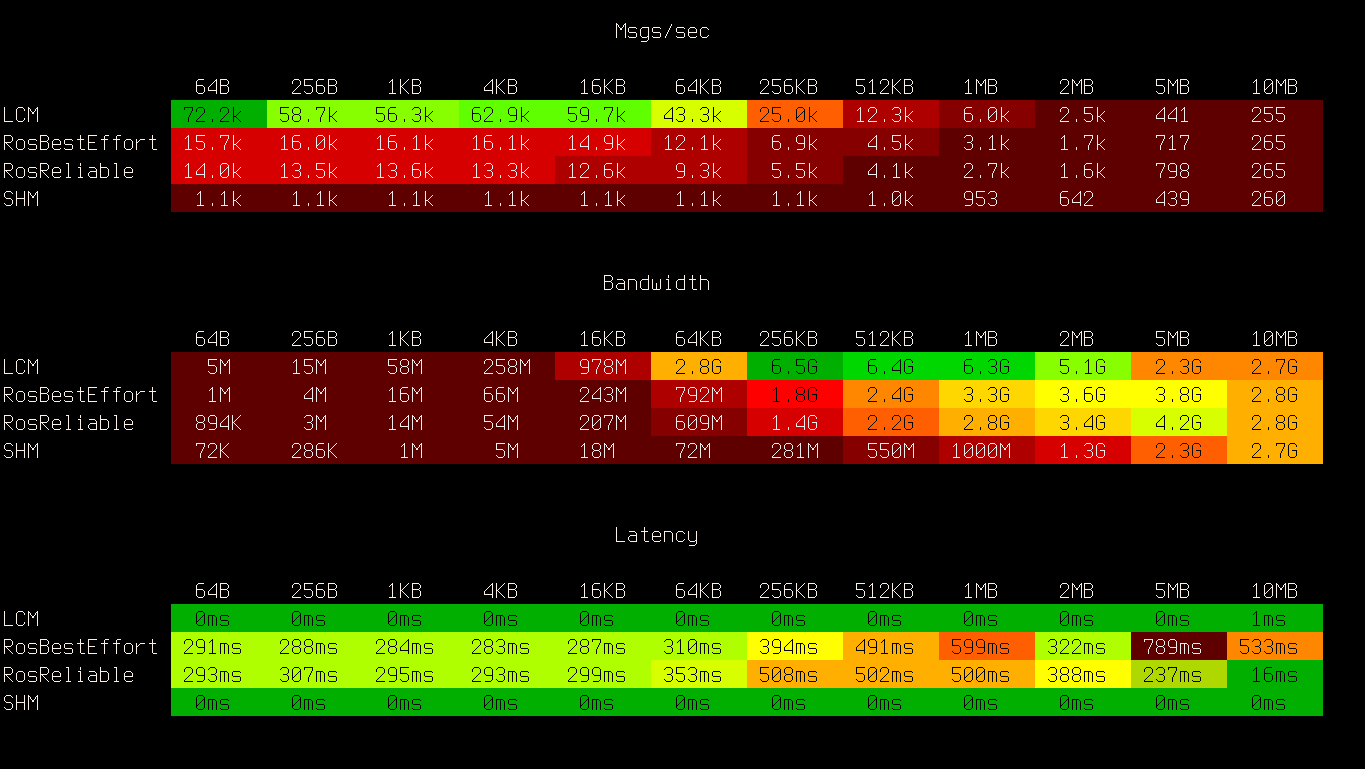
Quick view on performance of our pubsub backends:
```sh skip theme={null}
python -m pytest -sv -k "not bytes" dimos/protocol/pubsub/benchmark/tool_benchmark.py
```
## Abstraction layers
## What the transport layer guarantees (and what it doesn’t)
Modules **don’t** know or care *how* data moves. They just:
* emit messages (broadcast)
* subscribe to messages (receive)
A transport is responsible for the mechanics of delivery (IPC, sockets, Redis, ROS 2, etc.).
**Important:** delivery semantics depend on the backend:
* Some are **best-effort** (e.g., UDP multicast / LCM): loss can happen.
* Some can be **reliable** (e.g., TCP-backed, Redis, some DDS configs) but may add latency/backpressure.
So: treat the API as uniform, but pick a backend whose semantics match the task.
## Choosing a backend
For most users, the important choice is between `lcm`, `zenoh`, and shared memory overrides:
* `zenoh`: the default. Reliable delivery semantics and the same typed message model through `LCMEncoderMixin`.
* `lcm`: the legacy path, opt-in. Fast and simple, but UDP multicast is best-effort.
* shared memory (`pSHMTransport`, etc.): best for large local streams on a single machine.
At the CLI level, you can select the stream transport globally with:
```bash theme={null}
dimos --transport=lcm run unitree-go2
dimos --transport=zenoh run unitree-go2
```
Zenoh is the default on every platform. Pass `--transport=lcm` for the legacy multicast path.
## Zenoh quickstart
Zenoh ships with dimOS by default (`eclipse-zenoh` is a base dependency), so there is nothing extra to install.
Zenoh is the **default global stream transport** on every platform, so nothing below is
needed to turn it on -- only to turn it off.
### What the default talks to
A stock zenoh session is pinned to localhost. It listens on `tcp/127.0.0.1:0` and
scouts for peers over loopback only, so sibling dimOS processes on this machine
find each other and nothing on the LAN can link to them.
Reaching off the machine is opt-in, and each way is independent:
| You want | Pass |
| ------------------------------------------- | --------------------------------------------------------------- |
| A robot, dialed directly | `--robot-ip 192.168.1.42` (outbound; the listener stays pinned) |
| Any other peer or a router, dialed directly | `ZENOH_CONNECT=tcp/host:7447` |
| Peers discovered across the LAN | `ZENOH_SCOUTING=1` (also unpins the listener) |
| Scouting on one named interface | `ZENOH_INTERFACE=wlan0` (also unpins the listener) |
Scouting the LAN and refusing links from it are contradictory, so turning
discovery outward hands the listener back to zenoh's all-interfaces default.
An explicit `listen=[...]` on a session always wins over both.
**Two ways to override for one run or for your shell:**
1. **CLI:** `dimos --transport=zenoh ...` or `dimos --transport=lcm ...` (see [CLI](/docs/usage/cli.md) for precedence with `.env` and blueprints).
2. **Environment:** `DIMOS_TRANSPORT=zenoh` or `DIMOS_TRANSPORT=lcm`.
Typical **replay** (Zenoh is already the default, so no transport flag is required):
```bash theme={null}
dimos --dtop --replay --replay-db=go2_bigoffice run unitree-go2
```
Architecture notes (Rerun bridge) live under [Zenoh](#zenoh) in PubSub transports below.
## Benchmarks
Quick view on performance of our pubsub backends:
```sh skip theme={null}
python -m pytest -sv -k "not bytes" dimos/protocol/pubsub/benchmark/tool_benchmark.py
```

## Abstraction layers
Pikchr
```pikchr output=../assets/abstraction_layers.svg fold theme={null}
color = white
fill = none
linewid = 0.5in
boxwid = 1.0in
boxht = 0.4in
# Boxes with labels
B: box "Blueprints" rad 10px
arrow
M: box "Modules" rad 5px
arrow
T: box "Transports" rad 5px
arrow
P: box "PubSub" rad 5px
# Descriptions below
text "robot configs" at B.s + (0.1, -0.2in)
text "camera, nav" at M.s + (0, -0.2in)
text "LCM, SHM, ROS" at T.s + (0, -0.2in)
text "pub/sub API" at P.s + (0, -0.2in)
```
 We’ll go through these layers top-down.
## Using transports with blueprints
See [Blueprints](/docs/usage/blueprints.md) for the blueprint API.
From [`unitree/go2/blueprints/smart/unitree_go2.py`](/dimos/robot/unitree/go2/blueprints/smart/unitree_go2.py).
Example: rebind a few streams from the default `LCMTransport` to `ROSTransport` (defined at [`transport.py`](/dimos/core/transport.py#L226)) so you can visualize in **rviz2**.
```python skip theme={null}
nav = autoconnect(
basic,
voxel_mapper(voxel_size=0.1),
cost_mapper(),
replanning_a_star_planner(),
wavefront_frontier_explorer(),
).global_config(n_workers=6, robot_model="unitree_go2")
ros = nav.transports(
{
("lidar", PointCloud2): ROSTransport("lidar", PointCloud2),
("global_map", PointCloud2): ROSTransport("global_map", PointCloud2),
("odom", PoseStamped): ROSTransport("odom", PoseStamped),
("color_image", Image): ROSTransport("color_image", Image),
}
)
```
## Using transports with modules
Each **stream** on a module can use a different transport. Set `.transport` on the stream **before starting** modules.
The runnable example below uses a tiny synthetic image publisher instead of `CameraModule` so it works without a webcam and in CI; the wiring is the same as with a real camera.
```python ansi=false theme={null}
import time
import numpy as np
import reactivex as rx
from dimos.core.core import rpc
from dimos.core.coordination.module_coordinator import ModuleCoordinator
from dimos.core.module import Module, ModuleConfig
from dimos.core.stream import In, Out
from dimos.core.transport import LCMTransport
from dimos.msgs.sensor_msgs.Image import Image, ImageFormat
class TickerCameraConfig(ModuleConfig):
frequency_hz: float = 2.0
class TickerCameraModule(Module):
"""Publish synthetic frames so this example runs without a webcam."""
config: TickerCameraConfig
color_image: Out[Image]
@rpc
def start(self) -> None:
super().start()
def emit(_: int) -> None:
img = Image.from_numpy(
np.zeros((480, 640, 3), dtype=np.uint8),
format=ImageFormat.RGB,
frame_id="synthetic",
)
self.color_image.publish(img)
period = 1.0 / max(self.config.frequency_hz, 0.1)
self.register_disposable(rx.interval(period).subscribe(emit))
class ImageListener(Module):
image: In[Image]
async def handle_image(self, img: Image) -> None:
print(f"Received: {img.shape}")
if __name__ == "__main__":
# Start local cluster and deploy modules to separate processes
dimos = ModuleCoordinator()
dimos.start()
camera = dimos.deploy(TickerCameraModule, frequency_hz=2.0)
listener = dimos.deploy(ImageListener)
# Choose a transport for the stream (example: LCM typed channel)
camera.color_image.transport = LCMTransport("/camera/rgb", Image)
# Connect listener input to camera output
listener.image.connect(camera.color_image)
dimos.start_all_modules()
time.sleep(2)
dimos.stop()
```
```results theme={null}
13:11:40.135 [inf][ation/worker_manager_python.py] Worker pool started. n_workers=2
13:11:40.776 [inf][/coordination/python_worker.py] Deployed module. module=TickerCameraModule module_id=0 worker_id=0
13:11:40.784 [inf][/coordination/python_worker.py] Deployed module. module=ImageListener module_id=1 worker_id=1
13:11:42.805 [inf][dination/module_coordinator.py] Stopping module... module=ImageListener
13:11:42.809 [inf][dination/module_coordinator.py] Module stopped. module=ImageListener
13:11:42.809 [inf][dination/module_coordinator.py] Stopping module... module=TickerCameraModule
13:11:42.860 [inf][dination/module_coordinator.py] Module stopped. module=TickerCameraModule
13:11:42.861 [inf][ation/worker_manager_python.py] Shutting down all workers...
Received: (480, 640, 3)
Received: (480, 640, 3)
Received: (480, 640, 3)
Received: (480, 640, 3)
13:11:42.862 [inf][/coordination/python_worker.py] Worker stopping module... module=ImageListener module_id=1 worker_id=1
13:11:42.862 [inf][/coordination/python_worker.py] Worker module stopped. module=ImageListener module_id=1 worker_id=1
13:11:42.914 [inf][/coordination/python_worker.py] Worker stopping module... module=TickerCameraModule module_id=0 worker_id=0
13:11:42.914 [inf][/coordination/python_worker.py] Worker module stopped. module=TickerCameraModule module_id=0 worker_id=0
13:11:42.920 [inf][ation/worker_manager_python.py] All workers shut down
```
See [Modules](/docs/usage/modules.md) for more on module architecture.
## Inspecting traffic (CLI)
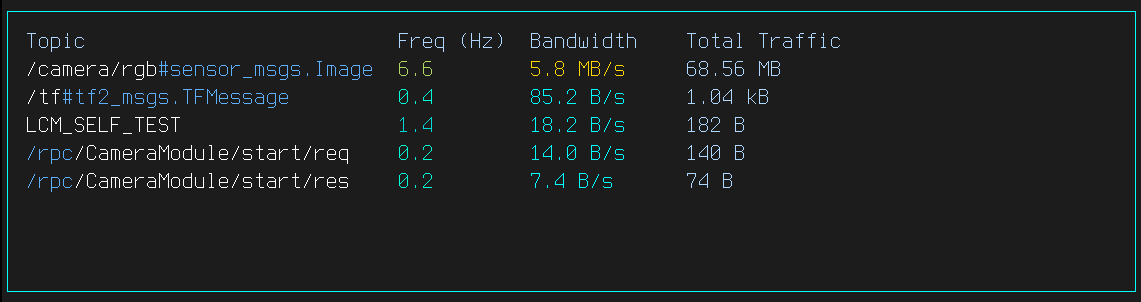
`dimos spy` is the universal transport spy: one live view of every topic moving on every
dimOS pubsub transport — names, message rates, bandwidth, sizes, and liveness — whether the
system runs on LCM, Zenoh, or both.
```bash theme={null}
dimos spy # everything, all transports
dimos spy --transport zenoh # filter to one transport (repeatable flag)
dimos lcmspy # deprecated alias for: dimos spy --transport lcm
```
`dimos topic echo /topic` listens on typed channels like `/topic#pkg.Msg` and decodes automatically:
```sh skip theme={null}
Listening on /camera/rgb (inferring from typed LCM channels like '/camera/rgb#pkg.Msg')... (Ctrl+C to stop)
Image(shape=(480, 640, 3), format=RGB, dtype=uint8, dev=cpu, ts=2026-01-24 20:28:59)
```
## Implementing a transport
At the stream layer, a transport is implemented by subclassing `Transport` (see [`core/stream.py`](/dimos/core/stream.py#L83)) and implementing:
* `broadcast(...)`
* `subscribe(...)`
Your `Transport.__init__` args can be anything meaningful for your backend:
* `(ip, port)`
* a shared-memory segment name
* a filesystem path
* a Redis channel
Encoding is an implementation detail, but we encourage using LCM-compatible message types when possible.
### Encoding helpers
Many of our message types provide `lcm_encode` / `lcm_decode` for compact, language-agnostic binary encoding (often faster than pickle). For details, see [LCM](/docs/usage/lcm.md).
## PubSub transports
Even though transport can be anything (TCP connection, unix socket) for now all our transport backends implement the `PubSub` interface.
* `publish(topic, message)`
* `subscribe(topic, callback) -> unsubscribe`
```python theme={null}
from dimos.protocol.pubsub.spec import PubSub
import inspect
print(inspect.getsource(PubSub.publish))
print(inspect.getsource(PubSub.subscribe))
```
```results theme={null}
@abstractmethod
def publish(self, topic: TopicT, message: MsgT) -> None:
"""Publish a message to a topic."""
...
@abstractmethod
def subscribe(
self, topic: TopicT, callback: Callable[[MsgT, TopicT], None]
) -> Callable[[], None]:
"""Subscribe to a topic with a callback. returns unsubscribe function"""
...
```
Topic/message types are flexible: bytes, JSON, or our ROS-compatible [LCM](/docs/usage/lcm.md) types. We also have pickle-based transports for arbitrary Python objects.
### LCM (UDP multicast)
LCM is UDP multicast. It’s very fast on a robot LAN, but it’s **best-effort** (packets can drop).
For local emission it autoconfigures system in a way in which it's more robust and faster then other more common protocols like ROS, DDS
```python theme={null}
from dimos.msgs.geometry_msgs.Vector3 import Vector3
from dimos.protocol.pubsub.impl.lcmpubsub import LCM, Topic
lcm = LCM()
lcm.start()
received = []
topic = Topic("/robot/velocity", Vector3)
lcm.subscribe(topic, lambda msg, t: received.append(msg))
lcm.publish(topic, Vector3(1.0, 0.0, 0.5))
import time
time.sleep(0.1)
print(f"Received velocity: x={received[0].x}, y={received[0].y}, z={received[0].z}")
lcm.stop()
```
```results theme={null}
Received velocity: x=1.0, y=0.0, z=0.5
```
### Zenoh
Zenoh provides network pubsub without relying on UDP multicast for the user-facing stream transport. In dimOS it carries the same typed messages by encoding them with `LCMEncoderMixin`, so existing `dimos.msgs.*` types still work.
Use Zenoh when:
* you want a transport that behaves better than UDP multicast on macOS
* you are replaying large or high-rate data and want a more reliable network path
* you want to keep the dimOS typed stream model while changing the transport backend
At the stream level, the transport wrappers are `ZenohTransport` and `pZenohTransport`. Install, defaults, and CLI versus environment overrides are in the [Zenoh quickstart](#zenoh-quickstart) above.
Performance note: zenoh's session-to-session path (modules in different processes, the common case) benchmarks faster than LCM for small messages and for >=2MiB ones. Delivery *within* one shared session (co-located modules in one worker) is its slow path for 256KiB-1MiB messages (a few GiB/s); pin shared memory transports for heavy co-located streams. The benchmark has both cases (`Zenoh` = shared session, `ZenohPeers` = separate sessions).
The Rerun bridge also follows the global transport: all channels including TF flow over the active backend, and the bridge listens only on it. To additionally bridge external LCM publishers while running Zenoh, pass an explicit `pubsubs=[Zenoh(), LCM()]`.
#### Per-topic QoS
Zenoh publisher QoS lives on the Zenoh `Topic` object (see [`zenohpubsub.py`](/dimos/protocol/pubsub/impl/zenohpubsub.py#L27)):
```python skip theme={null}
from dimos.core.transport import ZenohTransport
from dimos.protocol.pubsub.impl.zenohpubsub import Topic, ZenohQoS
blueprint = blueprint.transports(
{("image", CameraModule): ZenohTransport(Topic("dimos/image", Image, qos=ZenohQoS(reliability="best_effort", congestion_control="drop")))}
)
```
When the factory builds transports from the global switch, it applies defaults (`default_zenoh_qos` in [`transport_factory.py`](/dimos/core/transport_factory.py#L65)):
* The agent channels (`human_input`, `agent`, `agent_idle`): reliable, block under congestion (never drop).
* `Image`/`PointCloud2` streams: best-effort, drop under congestion (latest wins).
* Everything else: zenoh defaults (reliable, drop under congestion).
The publisher for a key is declared with the first publish's QoS. LCM has no per-topic settings, so QoS only applies when `transport=zenoh`.
### Shared memory (IPC)
Shared memory is highest performance, but only works on the **same machine**.
```python theme={null}
from dimos.protocol.pubsub.impl.shmpubsub import PickleSharedMemory
shm = PickleSharedMemory(prefer="cpu")
shm.start()
received = []
shm.subscribe("test/topic", lambda msg, topic: received.append(msg))
shm.publish("test/topic", {"data": [1, 2, 3]})
import time
time.sleep(0.1)
print(f"Received: {received}")
shm.stop()
```
```results theme={null}
Received: [{'data': [1, 2, 3]}]
```
### DDS Transport
For network communication, DDS uses the Data Distribution Service (DDS) protocol:
```python skip session=dds_demo ansi=false theme={null}
from dataclasses import dataclass
from cyclonedds.idl import IdlStruct
from dimos.protocol.pubsub.impl.ddspubsub import DDS, Topic
@dataclass
class SensorReading(IdlStruct):
value: float
dds = DDS()
dds.start()
received = []
sensor_topic = Topic(name="sensors/temperature", data_type=SensorReading)
dds.subscribe(sensor_topic, lambda msg, t: received.append(msg))
dds.publish(sensor_topic, SensorReading(value=22.5))
import time
time.sleep(0.1)
print(f"Received: {received}")
dds.stop()
```
```results theme={null}
Received: [SensorReading(value=22.5)]
```
## A minimal transport: `Memory`
The simplest toy backend is `Memory` (single process). Start from there when implementing a new pubsub backend.
```python theme={null}
from dimos.protocol.pubsub.impl.memory import Memory
bus = Memory()
received = []
unsubscribe = bus.subscribe("sensor/data", lambda msg, topic: received.append(msg))
bus.publish("sensor/data", {"temperature": 22.5})
bus.publish("sensor/data", {"temperature": 23.0})
print(f"Received {len(received)} messages:")
for msg in received:
print(f" {msg}")
unsubscribe()
```
```results theme={null}
Received 2 messages:
{'temperature': 22.5}
{'temperature': 23.0}
```
See [`pubsub/impl/memory.py`](/dimos/protocol/pubsub/impl/memory.py) for the complete source.
## Encode/decode mixins
Transports often need to serialize messages before sending and deserialize after receiving.
`PubSubEncoderMixin` at [`pubsub/encoders.py`](/dimos/protocol/pubsub/encoders.py#L39) provides a clean way to add encoding/decoding to any pubsub implementation.
### Available mixins
| Mixin | Encoding | Use case |
| -------------------- | --------------- | ---------------------------------- |
| `PickleEncoderMixin` | Python pickle | Any Python object, Python-only |
| `LCMEncoderMixin` | LCM binary | Cross-language (C/C++/Python/Go/…) |
| `JpegEncoderMixin` | JPEG compressed | Image data, reduces bandwidth |
`LCMEncoderMixin` is especially useful: you can use LCM message definitions with *any* transport (not just UDP multicast). See [LCM](/docs/usage/lcm.md) for details.
### Creating a custom mixin
```python session=jsonencoder no-result theme={null}
import json
from dimos.protocol.pubsub.encoders import PubSubEncoderMixin
class JsonEncoderMixin(PubSubEncoderMixin[str, dict, bytes]):
def encode(self, msg: dict, topic: str) -> bytes:
return json.dumps(msg).encode("utf-8")
def decode(self, msg: bytes, topic: str) -> dict:
return json.loads(msg.decode("utf-8"))
```
Combine with a pubsub implementation via multiple inheritance:
```python session=jsonencoder no-result theme={null}
from dimos.protocol.pubsub.impl.memory import Memory
class MyJsonPubSub(JsonEncoderMixin, Memory):
pass
```
Swap serialization by changing the mixin:
```python session=jsonencoder no-result theme={null}
from dimos.protocol.pubsub.encoders import PickleEncoderMixin
from dimos.protocol.pubsub.impl.memory import Memory
class MyPicklePubSub(PickleEncoderMixin, Memory):
pass
```
## Testing and benchmarks
### Spec tests
See [`pubsub/test_spec.py`](/dimos/protocol/pubsub/test_spec.py) for the grid tests your new backend should pass.
### Benchmarks
Add your backend to benchmarks to compare in context:
```sh skip theme={null}
python -m pytest -sv -k "not bytes" dimos/protocol/pubsub/benchmark/tool_benchmark.py
```
# Available transports
| Transport | Use case | Cross-process | Network | Notes |
| -------------- | ----------------------------------- | ------------- | ------- | ------------------------------------- |
| `Memory` | Testing only, single process | No | No | Minimal reference impl |
| `SharedMemory` | Multi-process on same machine | Yes | No | Highest throughput (IPC) |
| `LCM` | Robot LAN broadcast (UDP multicast) | Yes | Yes | Best-effort; can drop packets on LAN |
| `Zenoh` | Reliable network stream transport | Yes | Yes | Recommended on macOS for heavy replay |
| `Redis` | Network pubsub via Redis server | Yes | Yes | Central broker; adds hop |
| `ROS` | ROS 2 topic communication | Yes | Yes | Integrates with RViz/ROS tools |
| `DDS` | Cyclone DDS without ROS (WIP) | Yes | Yes | WIP |
We’ll go through these layers top-down.
## Using transports with blueprints
See [Blueprints](/docs/usage/blueprints.md) for the blueprint API.
From [`unitree/go2/blueprints/smart/unitree_go2.py`](/dimos/robot/unitree/go2/blueprints/smart/unitree_go2.py).
Example: rebind a few streams from the default `LCMTransport` to `ROSTransport` (defined at [`transport.py`](/dimos/core/transport.py#L226)) so you can visualize in **rviz2**.
```python skip theme={null}
nav = autoconnect(
basic,
voxel_mapper(voxel_size=0.1),
cost_mapper(),
replanning_a_star_planner(),
wavefront_frontier_explorer(),
).global_config(n_workers=6, robot_model="unitree_go2")
ros = nav.transports(
{
("lidar", PointCloud2): ROSTransport("lidar", PointCloud2),
("global_map", PointCloud2): ROSTransport("global_map", PointCloud2),
("odom", PoseStamped): ROSTransport("odom", PoseStamped),
("color_image", Image): ROSTransport("color_image", Image),
}
)
```
## Using transports with modules
Each **stream** on a module can use a different transport. Set `.transport` on the stream **before starting** modules.
The runnable example below uses a tiny synthetic image publisher instead of `CameraModule` so it works without a webcam and in CI; the wiring is the same as with a real camera.
```python ansi=false theme={null}
import time
import numpy as np
import reactivex as rx
from dimos.core.core import rpc
from dimos.core.coordination.module_coordinator import ModuleCoordinator
from dimos.core.module import Module, ModuleConfig
from dimos.core.stream import In, Out
from dimos.core.transport import LCMTransport
from dimos.msgs.sensor_msgs.Image import Image, ImageFormat
class TickerCameraConfig(ModuleConfig):
frequency_hz: float = 2.0
class TickerCameraModule(Module):
"""Publish synthetic frames so this example runs without a webcam."""
config: TickerCameraConfig
color_image: Out[Image]
@rpc
def start(self) -> None:
super().start()
def emit(_: int) -> None:
img = Image.from_numpy(
np.zeros((480, 640, 3), dtype=np.uint8),
format=ImageFormat.RGB,
frame_id="synthetic",
)
self.color_image.publish(img)
period = 1.0 / max(self.config.frequency_hz, 0.1)
self.register_disposable(rx.interval(period).subscribe(emit))
class ImageListener(Module):
image: In[Image]
async def handle_image(self, img: Image) -> None:
print(f"Received: {img.shape}")
if __name__ == "__main__":
# Start local cluster and deploy modules to separate processes
dimos = ModuleCoordinator()
dimos.start()
camera = dimos.deploy(TickerCameraModule, frequency_hz=2.0)
listener = dimos.deploy(ImageListener)
# Choose a transport for the stream (example: LCM typed channel)
camera.color_image.transport = LCMTransport("/camera/rgb", Image)
# Connect listener input to camera output
listener.image.connect(camera.color_image)
dimos.start_all_modules()
time.sleep(2)
dimos.stop()
```
```results theme={null}
13:11:40.135 [inf][ation/worker_manager_python.py] Worker pool started. n_workers=2
13:11:40.776 [inf][/coordination/python_worker.py] Deployed module. module=TickerCameraModule module_id=0 worker_id=0
13:11:40.784 [inf][/coordination/python_worker.py] Deployed module. module=ImageListener module_id=1 worker_id=1
13:11:42.805 [inf][dination/module_coordinator.py] Stopping module... module=ImageListener
13:11:42.809 [inf][dination/module_coordinator.py] Module stopped. module=ImageListener
13:11:42.809 [inf][dination/module_coordinator.py] Stopping module... module=TickerCameraModule
13:11:42.860 [inf][dination/module_coordinator.py] Module stopped. module=TickerCameraModule
13:11:42.861 [inf][ation/worker_manager_python.py] Shutting down all workers...
Received: (480, 640, 3)
Received: (480, 640, 3)
Received: (480, 640, 3)
Received: (480, 640, 3)
13:11:42.862 [inf][/coordination/python_worker.py] Worker stopping module... module=ImageListener module_id=1 worker_id=1
13:11:42.862 [inf][/coordination/python_worker.py] Worker module stopped. module=ImageListener module_id=1 worker_id=1
13:11:42.914 [inf][/coordination/python_worker.py] Worker stopping module... module=TickerCameraModule module_id=0 worker_id=0
13:11:42.914 [inf][/coordination/python_worker.py] Worker module stopped. module=TickerCameraModule module_id=0 worker_id=0
13:11:42.920 [inf][ation/worker_manager_python.py] All workers shut down
```
See [Modules](/docs/usage/modules.md) for more on module architecture.
## Inspecting traffic (CLI)
`dimos spy` is the universal transport spy: one live view of every topic moving on every
dimOS pubsub transport — names, message rates, bandwidth, sizes, and liveness — whether the
system runs on LCM, Zenoh, or both.
```bash theme={null}
dimos spy # everything, all transports
dimos spy --transport zenoh # filter to one transport (repeatable flag)
dimos lcmspy # deprecated alias for: dimos spy --transport lcm
```

`dimos topic echo /topic` listens on typed channels like `/topic#pkg.Msg` and decodes automatically:
```sh skip theme={null}
Listening on /camera/rgb (inferring from typed LCM channels like '/camera/rgb#pkg.Msg')... (Ctrl+C to stop)
Image(shape=(480, 640, 3), format=RGB, dtype=uint8, dev=cpu, ts=2026-01-24 20:28:59)
```
## Implementing a transport
At the stream layer, a transport is implemented by subclassing `Transport` (see [`core/stream.py`](/dimos/core/stream.py#L83)) and implementing:
* `broadcast(...)`
* `subscribe(...)`
Your `Transport.__init__` args can be anything meaningful for your backend:
* `(ip, port)`
* a shared-memory segment name
* a filesystem path
* a Redis channel
Encoding is an implementation detail, but we encourage using LCM-compatible message types when possible.
### Encoding helpers
Many of our message types provide `lcm_encode` / `lcm_decode` for compact, language-agnostic binary encoding (often faster than pickle). For details, see [LCM](/docs/usage/lcm.md).
## PubSub transports
Even though transport can be anything (TCP connection, unix socket) for now all our transport backends implement the `PubSub` interface.
* `publish(topic, message)`
* `subscribe(topic, callback) -> unsubscribe`
```python theme={null}
from dimos.protocol.pubsub.spec import PubSub
import inspect
print(inspect.getsource(PubSub.publish))
print(inspect.getsource(PubSub.subscribe))
```
```results theme={null}
@abstractmethod
def publish(self, topic: TopicT, message: MsgT) -> None:
"""Publish a message to a topic."""
...
@abstractmethod
def subscribe(
self, topic: TopicT, callback: Callable[[MsgT, TopicT], None]
) -> Callable[[], None]:
"""Subscribe to a topic with a callback. returns unsubscribe function"""
...
```
Topic/message types are flexible: bytes, JSON, or our ROS-compatible [LCM](/docs/usage/lcm.md) types. We also have pickle-based transports for arbitrary Python objects.
### LCM (UDP multicast)
LCM is UDP multicast. It’s very fast on a robot LAN, but it’s **best-effort** (packets can drop).
For local emission it autoconfigures system in a way in which it's more robust and faster then other more common protocols like ROS, DDS
```python theme={null}
from dimos.msgs.geometry_msgs.Vector3 import Vector3
from dimos.protocol.pubsub.impl.lcmpubsub import LCM, Topic
lcm = LCM()
lcm.start()
received = []
topic = Topic("/robot/velocity", Vector3)
lcm.subscribe(topic, lambda msg, t: received.append(msg))
lcm.publish(topic, Vector3(1.0, 0.0, 0.5))
import time
time.sleep(0.1)
print(f"Received velocity: x={received[0].x}, y={received[0].y}, z={received[0].z}")
lcm.stop()
```
```results theme={null}
Received velocity: x=1.0, y=0.0, z=0.5
```
### Zenoh
Zenoh provides network pubsub without relying on UDP multicast for the user-facing stream transport. In dimOS it carries the same typed messages by encoding them with `LCMEncoderMixin`, so existing `dimos.msgs.*` types still work.
Use Zenoh when:
* you want a transport that behaves better than UDP multicast on macOS
* you are replaying large or high-rate data and want a more reliable network path
* you want to keep the dimOS typed stream model while changing the transport backend
At the stream level, the transport wrappers are `ZenohTransport` and `pZenohTransport`. Install, defaults, and CLI versus environment overrides are in the [Zenoh quickstart](#zenoh-quickstart) above.
Performance note: zenoh's session-to-session path (modules in different processes, the common case) benchmarks faster than LCM for small messages and for >=2MiB ones. Delivery *within* one shared session (co-located modules in one worker) is its slow path for 256KiB-1MiB messages (a few GiB/s); pin shared memory transports for heavy co-located streams. The benchmark has both cases (`Zenoh` = shared session, `ZenohPeers` = separate sessions).
The Rerun bridge also follows the global transport: all channels including TF flow over the active backend, and the bridge listens only on it. To additionally bridge external LCM publishers while running Zenoh, pass an explicit `pubsubs=[Zenoh(), LCM()]`.
#### Per-topic QoS
Zenoh publisher QoS lives on the Zenoh `Topic` object (see [`zenohpubsub.py`](/dimos/protocol/pubsub/impl/zenohpubsub.py#L27)):
```python skip theme={null}
from dimos.core.transport import ZenohTransport
from dimos.protocol.pubsub.impl.zenohpubsub import Topic, ZenohQoS
blueprint = blueprint.transports(
{("image", CameraModule): ZenohTransport(Topic("dimos/image", Image, qos=ZenohQoS(reliability="best_effort", congestion_control="drop")))}
)
```
When the factory builds transports from the global switch, it applies defaults (`default_zenoh_qos` in [`transport_factory.py`](/dimos/core/transport_factory.py#L65)):
* The agent channels (`human_input`, `agent`, `agent_idle`): reliable, block under congestion (never drop).
* `Image`/`PointCloud2` streams: best-effort, drop under congestion (latest wins).
* Everything else: zenoh defaults (reliable, drop under congestion).
The publisher for a key is declared with the first publish's QoS. LCM has no per-topic settings, so QoS only applies when `transport=zenoh`.
### Shared memory (IPC)
Shared memory is highest performance, but only works on the **same machine**.
```python theme={null}
from dimos.protocol.pubsub.impl.shmpubsub import PickleSharedMemory
shm = PickleSharedMemory(prefer="cpu")
shm.start()
received = []
shm.subscribe("test/topic", lambda msg, topic: received.append(msg))
shm.publish("test/topic", {"data": [1, 2, 3]})
import time
time.sleep(0.1)
print(f"Received: {received}")
shm.stop()
```
```results theme={null}
Received: [{'data': [1, 2, 3]}]
```
### DDS Transport
For network communication, DDS uses the Data Distribution Service (DDS) protocol:
```python skip session=dds_demo ansi=false theme={null}
from dataclasses import dataclass
from cyclonedds.idl import IdlStruct
from dimos.protocol.pubsub.impl.ddspubsub import DDS, Topic
@dataclass
class SensorReading(IdlStruct):
value: float
dds = DDS()
dds.start()
received = []
sensor_topic = Topic(name="sensors/temperature", data_type=SensorReading)
dds.subscribe(sensor_topic, lambda msg, t: received.append(msg))
dds.publish(sensor_topic, SensorReading(value=22.5))
import time
time.sleep(0.1)
print(f"Received: {received}")
dds.stop()
```
```results theme={null}
Received: [SensorReading(value=22.5)]
```
## A minimal transport: `Memory`
The simplest toy backend is `Memory` (single process). Start from there when implementing a new pubsub backend.
```python theme={null}
from dimos.protocol.pubsub.impl.memory import Memory
bus = Memory()
received = []
unsubscribe = bus.subscribe("sensor/data", lambda msg, topic: received.append(msg))
bus.publish("sensor/data", {"temperature": 22.5})
bus.publish("sensor/data", {"temperature": 23.0})
print(f"Received {len(received)} messages:")
for msg in received:
print(f" {msg}")
unsubscribe()
```
```results theme={null}
Received 2 messages:
{'temperature': 22.5}
{'temperature': 23.0}
```
See [`pubsub/impl/memory.py`](/dimos/protocol/pubsub/impl/memory.py) for the complete source.
## Encode/decode mixins
Transports often need to serialize messages before sending and deserialize after receiving.
`PubSubEncoderMixin` at [`pubsub/encoders.py`](/dimos/protocol/pubsub/encoders.py#L39) provides a clean way to add encoding/decoding to any pubsub implementation.
### Available mixins
| Mixin | Encoding | Use case |
| -------------------- | --------------- | ---------------------------------- |
| `PickleEncoderMixin` | Python pickle | Any Python object, Python-only |
| `LCMEncoderMixin` | LCM binary | Cross-language (C/C++/Python/Go/…) |
| `JpegEncoderMixin` | JPEG compressed | Image data, reduces bandwidth |
`LCMEncoderMixin` is especially useful: you can use LCM message definitions with *any* transport (not just UDP multicast). See [LCM](/docs/usage/lcm.md) for details.
### Creating a custom mixin
```python session=jsonencoder no-result theme={null}
import json
from dimos.protocol.pubsub.encoders import PubSubEncoderMixin
class JsonEncoderMixin(PubSubEncoderMixin[str, dict, bytes]):
def encode(self, msg: dict, topic: str) -> bytes:
return json.dumps(msg).encode("utf-8")
def decode(self, msg: bytes, topic: str) -> dict:
return json.loads(msg.decode("utf-8"))
```
Combine with a pubsub implementation via multiple inheritance:
```python session=jsonencoder no-result theme={null}
from dimos.protocol.pubsub.impl.memory import Memory
class MyJsonPubSub(JsonEncoderMixin, Memory):
pass
```
Swap serialization by changing the mixin:
```python session=jsonencoder no-result theme={null}
from dimos.protocol.pubsub.encoders import PickleEncoderMixin
from dimos.protocol.pubsub.impl.memory import Memory
class MyPicklePubSub(PickleEncoderMixin, Memory):
pass
```
## Testing and benchmarks
### Spec tests
See [`pubsub/test_spec.py`](/dimos/protocol/pubsub/test_spec.py) for the grid tests your new backend should pass.
### Benchmarks
Add your backend to benchmarks to compare in context:
```sh skip theme={null}
python -m pytest -sv -k "not bytes" dimos/protocol/pubsub/benchmark/tool_benchmark.py
```
# Available transports
| Transport | Use case | Cross-process | Network | Notes |
| -------------- | ----------------------------------- | ------------- | ------- | ------------------------------------- |
| `Memory` | Testing only, single process | No | No | Minimal reference impl |
| `SharedMemory` | Multi-process on same machine | Yes | No | Highest throughput (IPC) |
| `LCM` | Robot LAN broadcast (UDP multicast) | Yes | Yes | Best-effort; can drop packets on LAN |
| `Zenoh` | Reliable network stream transport | Yes | Yes | Recommended on macOS for heavy replay |
| `Redis` | Network pubsub via Redis server | Yes | Yes | Central broker; adds hop |
| `ROS` | ROS 2 topic communication | Yes | Yes | Integrates with RViz/ROS tools |
| `DDS` | Cyclone DDS without ROS (WIP) | Yes | Yes | WIP |